It started with being bored and idle on a lazy Saturday
There is a saying about “idle hands.” I remember a 90s horror-comedy about the subject. Well, on this particular Saturday I had two things: a pair of idle hands and an old HP Microserver.
It's not particularly glamorous hardware, but I've always had a soft spot for machines that still have useful life left in them. Especially when I can persuade them to do something they weren't originally designed to do.
I wanted to expand its storage.
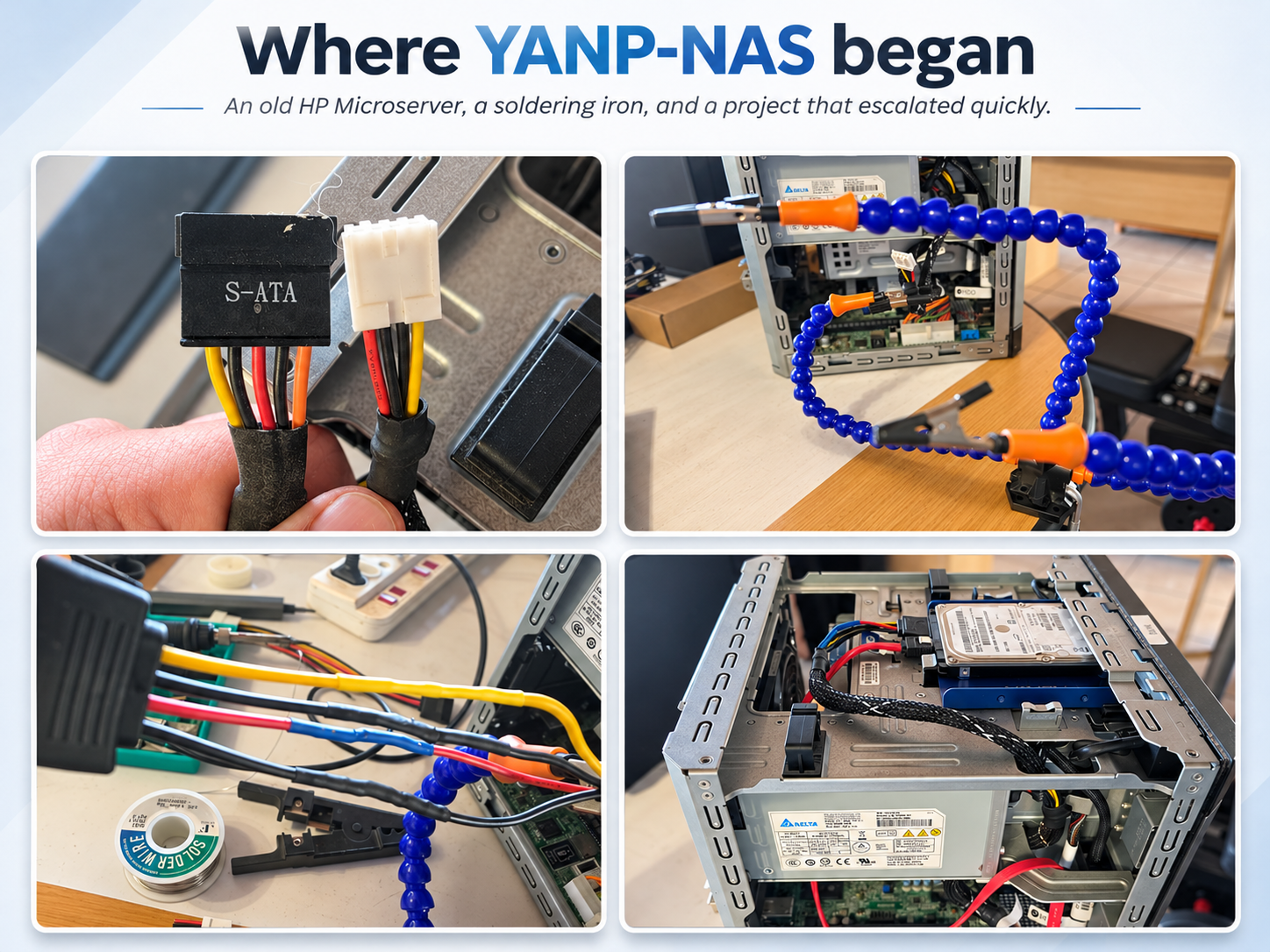
The Microserver already had its normal drive bays, but I wanted to use a laptop hard drive as a dedicated operating system disk, freeing up the main bays for storage.
There was a perfectly good optical drive bay sitting there. The machine had a spare SATA connection. The only slight complication was getting power to the drive.
So I got out the soldering iron.
After a bit of cable modification, some soldering, and the sort of engineering optimism that often accompanies projects involving old hardware, I had a laptop hard drive installed in the optical drive bay.
Problem solved.
Well, the first problem.
OK, now what do I do with it? I needed a NAS OS
Feeling like an engineering god because it didn’t catch fire when powered up, I realised I was no longer idle and bored. I had become curious. With the hardware sorted, I had a burning desire to turn it into something useful.
A network storage server for my home lab made perfect sense for my newly upgraded Microserver.
There are already some excellent NAS operating systems available. TrueNAS, OpenMediaVault and others have been around for years, with mature features and dedicated communities.
But as I explored the options, I kept finding that none quite matched what I wanted.
My requirements were fairly modest, at the time. (This is what we call foreshadowing, by the way.)
I wanted to manage individual disks without being forced into a particular storage arrangement. I wanted network shares that were straightforward to create and manage. I wanted something lightweight enough for older hardware, with an interface that didn't require me to remember a small encyclopedia of configuration details every time I wanted to make a change.
I also wanted my Proxmox Server to be able to back up Guests to the NAS, and doing it over Samba, NFS or rsync was going to be dictated by the NAS OS I decided to use.
No longer was I only curious, I became obstinate: Why should my backup strategy be dictated by whichever OS I choose? I wanted to be able to test several options and strategies to back up my laptop, my wife’s computer, the Proxmox server, and offer network storage to whoever wants it in the house.
I just needed a simple NAS that supported Samba sharing and native rsync.
This then led to the sort of decision that has caused software projects to grow wildly beyond their original scope since the invention of software.
I decided to build my own.
YANP-NAS was supposed to be simple
I called it YANP-NAS.
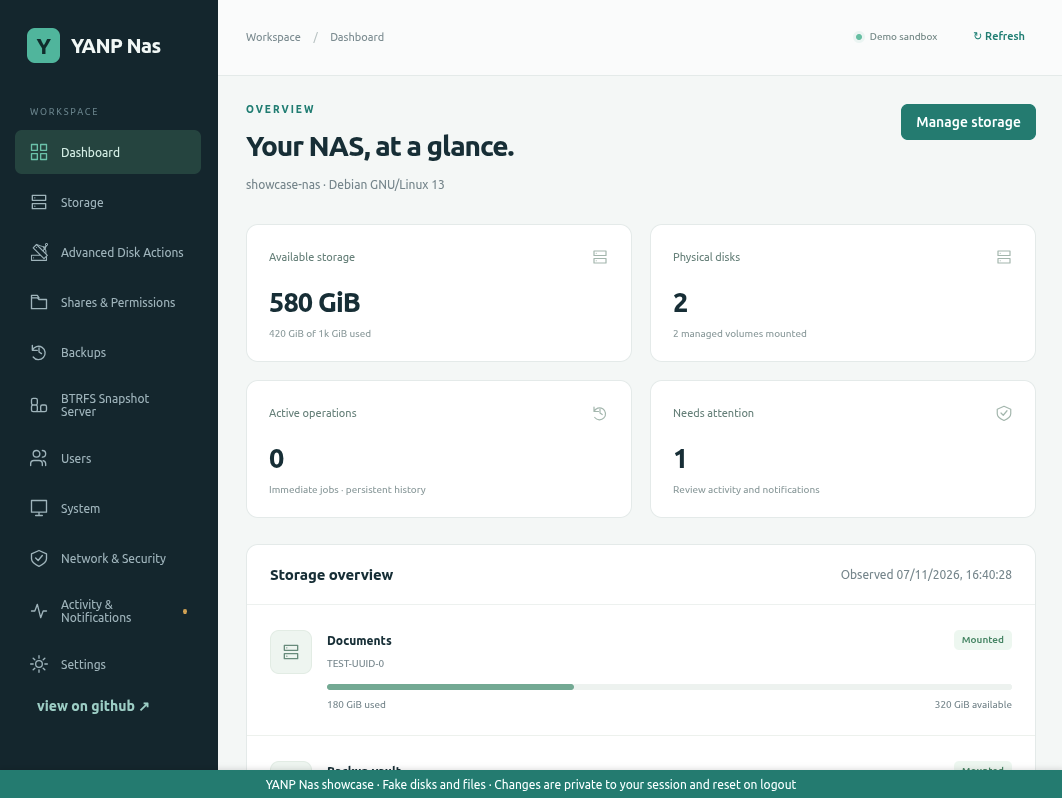
The idea was to build a straightforward NAS management interface on top of Debian and Linux's existing storage and file-sharing tools.
I wasn't trying to reinvent Linux storage, Samba or filesystems. Those tools already do their jobs extremely well.
What I wanted was to bring them together into something easier to manage.
A system where I could see my disks, prepare storage, configure shares and handle ordinary NAS administration without constantly dropping back into a terminal.
The initial vision was quite small.
And for a while, it stayed that way.
Then I started actually using it.
A NAS should be able to back up its own files, right?
Having network shares is useful. Having somewhere to store your files is useful.
But what happens when one of those disks fails, or you accidentally delete something important?
I had other disks available. Some internal, some connected over USB.
Why shouldn't YANP be able to back up files from one storage location to another?
So I added file backup functionality.
Now I could use the NAS not just to share files, but also to create backups on another internal or external disk.
It was a natural extension of what the system already did.
There was just one problem.
Once you start thinking about protecting files, you inevitably start thinking about protecting entire disks.
Then came disk cloning
Sometimes you don't want to back up individual files.
Sometimes you want to replace a disk, migrate its contents, or recover as much as possible from a drive that might be failing. I could do it with two USB cradles from my laptop, but then my laptop would be dedicated to this task. What about the Proxmox server? No, that is not optimal for the purpose. My wife’s computer? I didn’t ask.
My gaze drifted to the little Microserver now humming contentedly on my desk.
Perfect. It has multiple drive bays, and I already have a working NAS OS on it, extending the feature set makes sense, right?
So I added disk cloning using GNU ddrescue.
I built two approaches into the interface: an ordinary fast cloning operation and a more intensive rescue approach for disks that might be damaged or unreliable.
But I also wanted the system to help prevent mistakes.
A disk involved in an active cloning operation shouldn't simultaneously be available for unrelated storage management operations.
And the NAS operating system disk should never be offered as a cloning source or destination through the interface.
So those protections became part of the design.
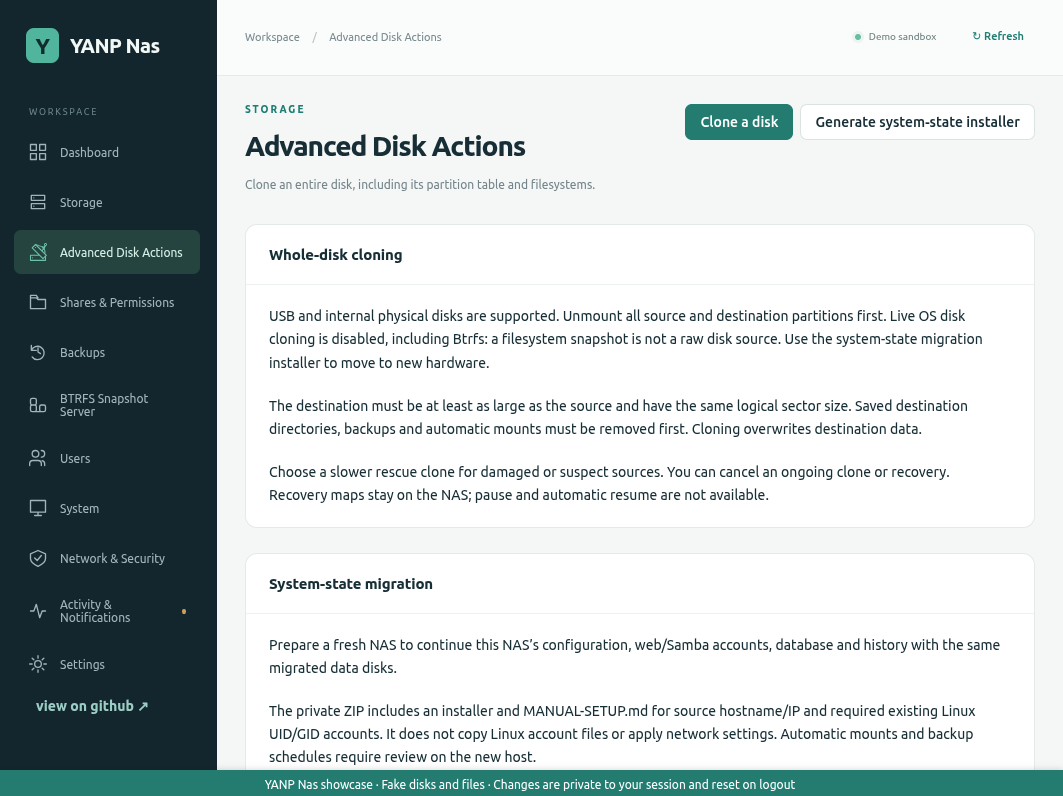
I also added a system-state export mechanism to help migrate the NAS configuration to new hardware without treating the operating system disk as just another disk to clone.
At this point, my simple file-sharing project had become a storage management and recovery tool.
Once I cloned my first disk I was satisfied that I had achieved what I wanted. I had simple Samba file sharing for the home and rsync backups. Both were backed up from their main storage on YANP to an external USB disk.
Life was good, but rsync was slow. Too slow. Again I became curious…
Then I remembered just how powerful Btrfs is
I've been using Linux long enough to appreciate what a good filesystem can do.
And Btrfs has a particularly interesting capability: snapshots.
A Btrfs snapshot can preserve the state of a subvolume at a point in time without immediately copying all its data into a completely separate filesystem.
Even better, Btrfs supports sending snapshots to another Btrfs filesystem, including incremental transfers that only need to communicate the changes between suitable snapshots.
So I started wondering:
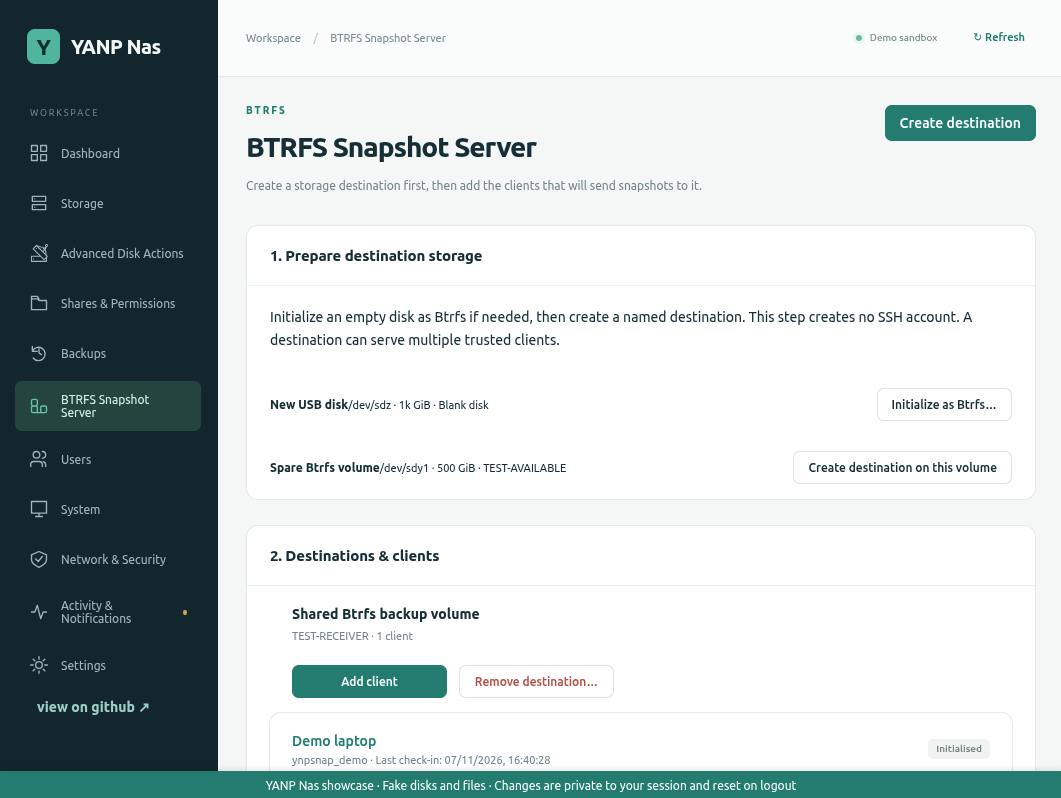
Why not make YANP-NAS a destination for Btrfs snapshots from other Linux machines?
My laptop already uses Btrfs. My wife’s computer uses Btrfs, my KVM guests use Btrfs.
Rather than relying entirely on conventional file copying, I could make snapshots locally and send them to the NAS.
So I started building that functionality.
A native Linux client could create snapshots on a schedule and transfer them to YANP-NAS, with subsequent transfers taking advantage of Btrfs incremental send and receive.
The native client is a Python script that runs as a systemd daemon and periodically talks to YANP. On YANP I can now set how many snapshots I want to keep on the client, and also send snapshots back to clients.
The NAS was no longer just a place to put files.
It was becoming part of a proper backup system.
And then I had another idea.
What if I just want one file back?
Backing up an entire snapshot is valuable.
Restoring an entire snapshot is sometimes necessary.
But what if I only want to recover one file?
Perhaps I deleted a document yesterday. Perhaps I overwrote something important. Perhaps I need to retrieve an older version of a configuration file.
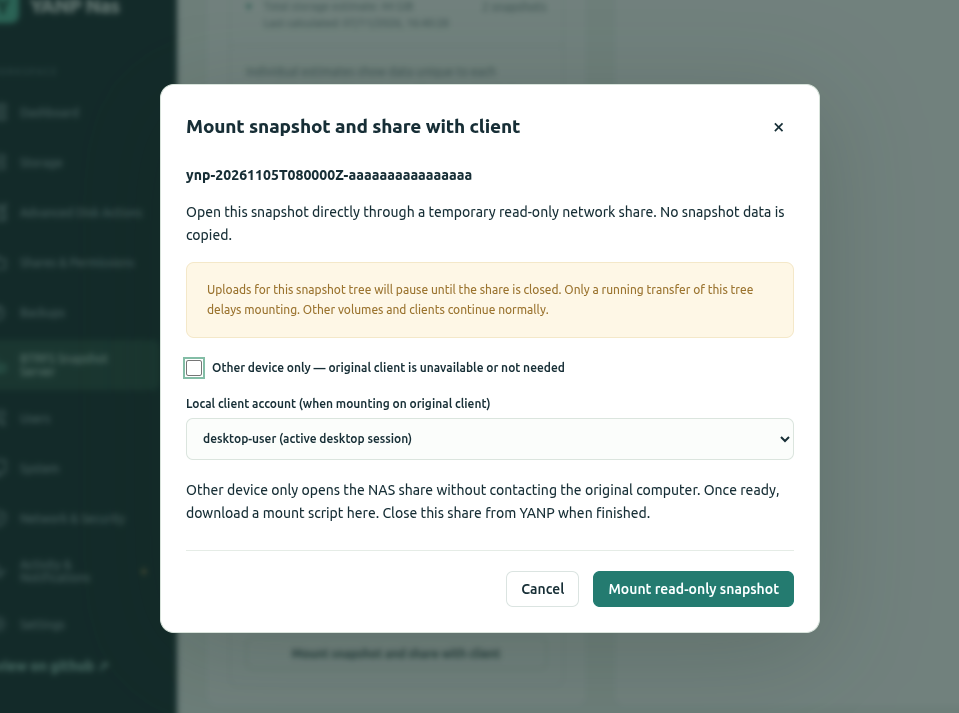
I don't want to restore an entire machine just to get that file, so I added the ability to select a stored Btrfs snapshot and mount it on YANP-NAS.
That mounted snapshot can then be made available through a network share, and the agent I built previously to manage snapshots gained the ability to receive the mount details from YANP and create a CIFS mount for the user to open locally and browse through their file manager.
Now I can browse the contents of a previous snapshot from the original snapshot client machine and copy out exactly what I need.
No complete restore required.
Which led rather naturally to the next question.
But what if I'm sitting at another machine?
This question was born of a two am “remembering session.” I remembered when I was still an IT technician working onsite with clients. I remembered that sometimes I needed to do a file restore from a backup when someone accidentally deleted something. I also remembered that it was not always possible or convenient to sit at the computer the restore needs to be done on.
Of course, I got curious again. If I have a snapshot exposed as a Samba share, there's no reason I shouldn't be able to access it from another computer, right?
But manually setting up network drives isn't particularly exciting, and I wanted the process to be convenient, leading to adding the ability to generate an automount script in the YANP interface that you can run on a Linux machine on the same network as YANP.
But what if I am on a Windows machine? So I added the ability to generate a PowerShell script that helps a Windows user connect to the selected recovery share. I am a benevolent overlord after all, my son and daughter both run Windows on their laptops.
The eventual implementation is simple: select the snapshot, make it available, connect from Windows or another Linux machine, and retrieve the file.
A Linux filesystem snapshot, created on one computer, replicated to a NAS, exposed through Samba, and accessed from another computer.
All because I might need to recover a single file.
I rather like that.
The engineering is in how the pieces fit together
The little HP Microserver is still on my desk, seemingly nesting in a gaggle of various cables and odd hard drives. I have a few failed drives that I have always kept around for testing how stuff works when something breaks. (Some people go fishing, I install failed drives in computers and watch how they behave. I think it’s fun.)
Looking at it sitting there, I'm proud of the individual capabilities, but what interests me most is how they work together.
Disk management, network sharing, backup jobs, cloning, Btrfs replication and file recovery are not separate ideas randomly collected in a web interface.
They are connected parts of a workflow.
A person needs storage. Then they need to protect that storage. Then they need to recover from failure. Then they need a practical way to get their data back.
Linux already provides many of the underlying building blocks.
The challenge is understanding those blocks well enough to combine them into something coherent, while making sure the interface doesn't casually offer operations that could destroy data.
That last part matters enormously when you're dealing with disks.
It's one thing to build an interface that can run powerful Linux commands.
It's another to design one that understands when those commands should not be available.
Is it still a simple NAS?
Pssh. No.
At least, not in terms of the number of features.
What began as a basic NAS management interface now includes functionality that I hadn't even considered when I started modifying the Microserver.
But I still want the experience of using it to be simple.
That's an important distinction.
Simple to use doesn't have to mean limited in capability.
There's more work to do on usability, guided workflows, documentation and making the various features approachable to people who haven't spent years administering Linux servers.
YANP-NAS is still an evolving project, by no means a polished commercial NAS appliance, but it is mine.
It already does something I find deeply satisfying: it solves real problems I encountered on real hardware.
Why I'm sharing it
YANP-NAS started as a personal project.
It still is.
I've made it available as an open-source project under GPLv2, partly because I enjoy building things and partly because I hope someone else might find it useful.
But there's another reason I want to share it.
I've spent much of my career working with infrastructure, systems administration, automation, troubleshooting and operational problems.
A lot of that work is invisible.
When infrastructure works properly, people generally don't think about the effort that went into making it work.
YANP-NAS is something tangible.
It's an opportunity to show how I approach engineering: identify a problem, understand the existing technology, build a workable solution, encounter the next problem, and keep improving the system.
And sometimes that process takes you somewhere you didn't expect.
In this case, from soldering a power cable into an old HP Microserver to building a NAS with snapshot replication and cross-platform file recovery.
Not bad for what was supposed to be a simple storage upgrade.